How to Troubleshoot Failed Subscription Renewals in MemberPress
A member signs up, their first payment goes through, and everything looks great. Then three months later, their renewal silently fails. No error on your end. No alert in your inbox. The member loses access, contacts support confused, and you’re left digging through transaction logs trying to figure out what went wrong.
If you run a membership site on MemberPress, you’ll hit this eventually. Renewal failures are one of the most common — and most quietly damaging — issues on subscription-based sites. They don’t crash your site or throw visible errors. They just quietly erode your recurring revenue, one missed payment at a time.
After resolving thousands of these cases, I’ve found that the vast majority fall into a handful of patterns. This article walks through each one, explains why it happens, and shows you how to fix it.
Why Renewals Fail Silently
Before jumping into specific fixes, it helps to understand how MemberPress handles renewals under the hood.
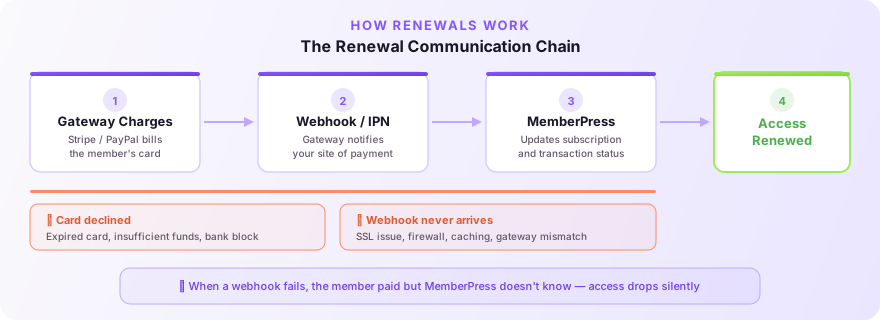
MemberPress doesn’t initiate renewal charges itself. Your payment gateway (Stripe, PayPal, etc.) handles the billing on its own schedule. When a renewal charge succeeds or fails, the gateway sends a notification back to your site — a webhook (Stripe) or IPN (PayPal) — and MemberPress processes that notification to update the subscription and transaction status.
This means renewal failures can happen at two levels:
- The gateway fails to charge the card — expired card, insufficient funds, bank decline.
- The gateway charges the card but MemberPress never gets the notification — the webhook/IPN is blocked, misconfigured, or silently dropped.
The first type is expected and manageable. The second type is where things get painful, because the member paid but MemberPress doesn’t know about it. Their access drops, your records are wrong, and nobody realizes until someone complains.
Step 1: Check the Subscription Status
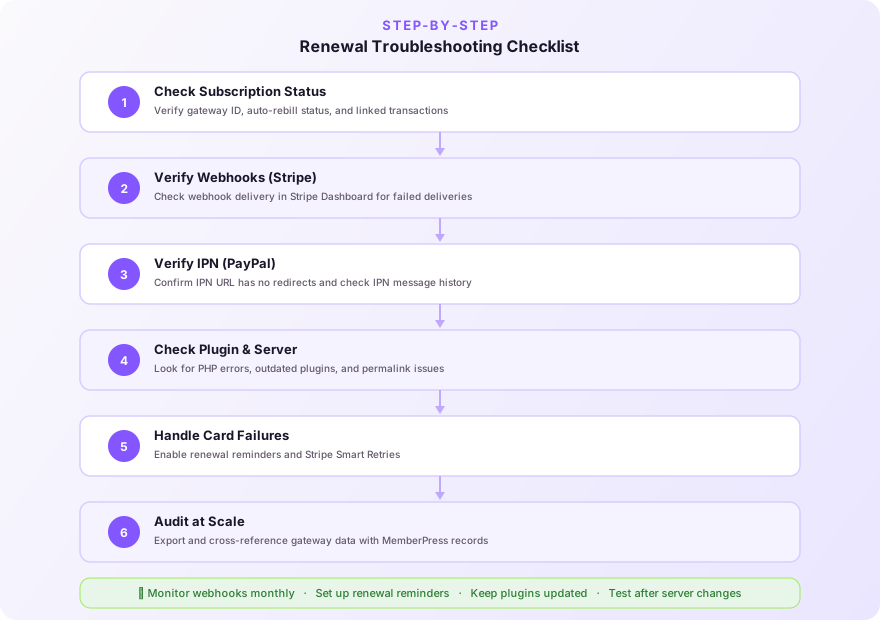
Start in MemberPress → Subscriptions. Find the member’s subscription and look at three things:
The Gateway ID. This should match what you see in your Stripe or PayPal dashboard. For Stripe, it looks like sub_xxxxxxxx. For PayPal, it’s the subscription profile ID. If you see something like mp-sub-xxxxxxxxxx instead, that’s a MemberPress-generated fallback ID — it means the subscription was never properly linked to the gateway. This alone can prevent renewals from being processed.
The Auto Rebill column. If this says “Pending” instead of “Enabled,” MemberPress won’t process incoming renewal notifications for this subscription. Click into the subscription and set it to Enabled.
The linked transactions. Open the subscription and scroll down to see associated transactions. If the latest one isn’t marked “Complete,” renewals may not process correctly. A “Pending” or “Failed” status on the most recent transaction can block the renewal chain.
Step 2: Verify Your Webhooks (Stripe)
If you’re using Stripe, this is the single most common source of renewal failures. Webhooks are the communication bridge between Stripe and MemberPress — if they’re broken, renewals will process in Stripe but never reach your site.
Check webhook delivery in Stripe. Log into your Stripe Dashboard, go to Developers → Webhooks, and find the endpoint pointing to your MemberPress site. Click into it and check the recent delivery attempts. If you see a wall of red failures (HTTP 400, 500, or timeouts), you’ve found your problem.
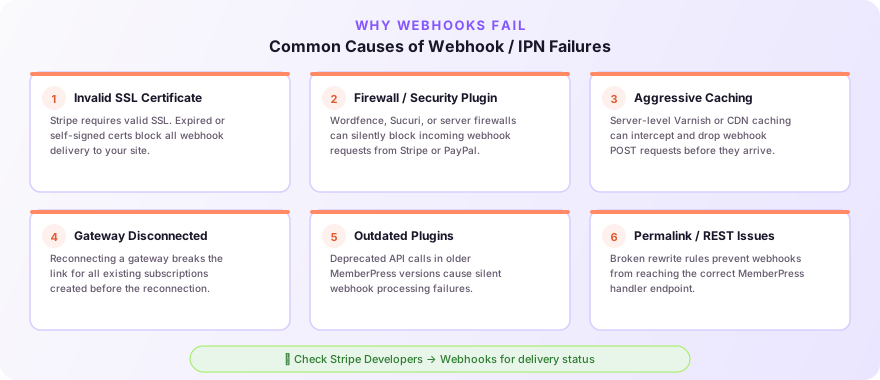
Common causes of webhook failures:
- Invalid SSL certificate. Stripe requires a valid SSL certificate on your site. If your cert is expired, self-signed, or misconfigured, Stripe will refuse to deliver webhooks. Check your cert status and renew if needed.
- Firewall or security plugin blocking requests. Plugins like Wordfence, Sucuri, or server-level firewalls (ModSecurity, Cloudflare) can block incoming webhook requests from Stripe. Whitelist Stripe’s webhook IPs or the webhook endpoint URL.
- Aggressive caching. Some hosting providers (especially managed WordPress hosts) use server-level caching that can interfere with webhook processing. If your host uses Varnish or a similar caching layer, make sure the MemberPress webhook URL is excluded from caching.
- Gateway disconnected and reconnected. If you ever disconnected and reconnected your Stripe gateway in MemberPress, subscriptions created before the reconnection may still be linked to the old gateway configuration. These subscriptions won’t receive webhook notifications from the new connection. The fix usually involves updating the gateway ID on affected subscriptions — a process that can get messy at scale.
Step 3: Verify Your IPN (PayPal)
PayPal uses IPN (Instant Payment Notification) instead of webhooks. The failure modes are similar but with a few PayPal-specific quirks.
Check your IPN URL. In PayPal, go to Settings → Notifications → Instant Payment Notifications and verify the IPN URL is correct. It should point to your site without any redirects. This is critical — if your site redirects HTTP to HTTPS (or www to non-www), the POST data from PayPal’s IPN gets stripped during the redirect and MemberPress never receives it.
Check IPN history. In PayPal, you can view IPN message history to see if messages were sent and whether they were received successfully. If you see messages being sent but retried repeatedly, your site is likely rejecting them.
Know the PayPal IPN limitations:
- PayPal does not send an IPN when a subscription is resumed after being paused. If a member pauses and then resumes, MemberPress may not know about it.
- IPN retries have a limited window. If your site was down or blocking IPNs for a period, PayPal may have given up retrying. You can resend missed IPNs from PayPal’s IPN history page.
Step 4: Check for Plugin and Server Conflicts
Sometimes the webhook/IPN arrives at your site but something on the server side prevents MemberPress from processing it.
Outdated plugins. An outdated version of MemberPress or a conflicting plugin can cause webhook processing to fail silently. Always keep MemberPress and your gateway add-ons up to date.
PHP errors. A fatal PHP error triggered during webhook processing will kill the request before MemberPress can update the subscription. Check your server’s PHP error log (usually in wp-content/debug.log if WP_DEBUG_LOG is enabled) for any errors happening around the time of failed renewals.
REST API or permalink issues. MemberPress relies on WordPress’s rewrite rules to route webhook notifications. If your permalinks are broken or your REST API is disabled by a security plugin, webhooks may not reach the right handler. Try re-saving your permalinks in Settings → Permalinks — sometimes that’s all it takes.
Step 5: Handle the Member-Side Failures
Not all renewal failures are technical. Sometimes the gateway processes things correctly and MemberPress receives the notification — but the charge itself was declined by the member’s bank.
Common member-side causes:
- Expired credit card. The most frequent cause. The card on file passes its expiration date and the gateway can’t charge it.
- Insufficient funds. The card is valid but the account balance is too low.
- Bank decline. The bank flags the recurring charge as suspicious, especially if it’s an international transaction or the amount changed.
What you can do:
- Enable renewal reminder emails. In MemberPress → Reminders, set up a “Before Subscription Renews” reminder. Send it 7–10 days before the renewal date so members have time to update their payment info if needed.
- Make it easy to update payment details. Members can update their card from their account page under the Subscriptions tab using the “Update” link. Make sure your account page is accessible and the update flow is clear. If members can’t find it, they’ll churn instead.
- Use Stripe’s Smart Retries. If you’re on Stripe, enable Smart Retries in your Stripe billing settings. Stripe will automatically retry failed charges at optimal times based on machine learning signals from across their network. This alone can recover a meaningful percentage of failed payments without you doing anything.
Step 6: Audit at Scale
If you’re dealing with more than a handful of failed renewals, doing this one subscription at a time isn’t practical. Here’s a systematic approach.
Export your subscriptions. Go to MemberPress → Subscriptions and export the full list. Look for patterns:
- Are failures clustered around a specific date? That suggests a server issue or gateway disruption.
- Are they all on the same gateway? That narrows it to a gateway-specific problem.
- Do they all have
mp-sub-ormp-txn-prefixed IDs? That points to a gateway linking issue.
Cross-reference with your gateway. Export your subscription data from Stripe or PayPal and compare it against MemberPress. Look for subscriptions that show active and billing in the gateway but inactive in MemberPress — those are your webhook/IPN failures.
Check your server logs around failure timestamps. If you can pinpoint when failures started, check your server access logs and error logs for that window. Look for 403/500 errors on the webhook endpoint, PHP fatal errors, or evidence of a deploy or plugin update that may have broken something.
Prevention Checklist
Once you’ve fixed the immediate problem, put guardrails in place so it doesn’t happen again.
Monitor your webhooks. Check your Stripe webhook delivery dashboard or PayPal IPN history at least monthly. Don’t wait for members to report problems.
Set up renewal reminders. Give members a heads-up before their card gets charged. It reduces declines and gives them a window to update expired cards.
Keep MemberPress and gateway add-ons updated. Gateway APIs evolve. Stripe and PayPal regularly deprecate old API versions. Staying updated prevents silent compatibility failures.
Test after every major change. After switching hosts, updating SSL certificates, changing security plugins, or modifying server caching — test a webhook delivery. You can send a test event from Stripe’s webhook dashboard to verify the connection is healthy.
Don’t delete and recreate gateways. If you need to reconnect a gateway, understand that existing subscriptions may lose their link. Plan for a migration path rather than a fresh start.
Wrapping Up
Failed renewals rarely announce themselves. They’re the kind of problem that festers quietly — a few missed payments here, a confused member there — until you realize you’ve been leaking revenue for weeks.
The good news is that most renewal failures come down to a handful of root causes, and once you know what to look for, they’re fixable. Start with the subscription status, verify your webhooks or IPN, check for server-side conflicts, and make sure members can easily update their payment details.
If you’ve dealt with renewal failures at scale or want to dig deeper into the debugging mindset behind this kind of work, check out Debugging at Scale: Lessons from Tier 3 Support. And if you’re running gift memberships and want better visibility into redemption tracking, take a look at How to Track and Manage Gift Memberships in MemberPress.
Have a similar challenge?
I help SaaS companies and WordPress platforms solve their most complex technical problems.
Let's Talk