How to Track and Manage Gift Memberships in MemberPress
If you run a membership site with MemberPress, you probably already know about the Gifting add-on. It lets your members purchase memberships as gifts for others — a great way to boost revenue and grow your audience organically. Someone buys a gift, the recipient gets an email with a redemption link, and they activate their membership. Simple.
Until it isn’t.
Once you start processing more than a handful of gift transactions, questions pile up fast. Who redeemed their gift? Who didn’t? How many gifts were sold last month? Can I export this data for my accountant? Why is there no easy way to resend a lost redemption email?
MemberPress Gifting handles the selling of gifts well, but it doesn’t give you much visibility into what happens after the purchase. This article walks through the common challenges and practical solutions for tracking and managing gift memberships at scale.
The Gift Membership Lifecycle
Before diving into solutions, it helps to understand the stages a gift membership goes through:
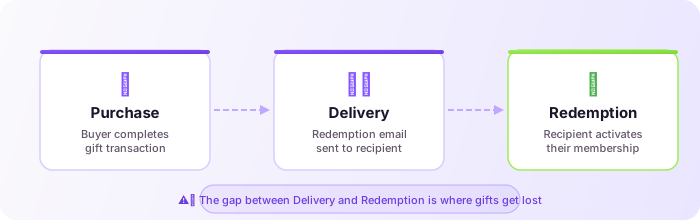
- Purchase — A buyer completes a transaction for a gift membership.
- Delivery — MemberPress sends a redemption email to the recipient.
- Redemption — The recipient clicks the link and activates their membership.
The gap between step 2 and step 3 is where most problems live. Emails land in spam. Recipients forget. Links get lost. And as a site owner, you have limited visibility into which gifts are stuck in limbo.
The Tracking Problem
Out of the box, MemberPress gives you a Transactions page and a Members page. Neither is designed to answer gift-specific questions like:
- How many gifts were purchased this quarter?
- Which gifts haven’t been redeemed yet?
- Who bought a gift for whom?
- What’s the redemption rate across different membership products?
You can piece some of this together by cross-referencing transaction data with user records, but it’s manual, time-consuming, and error-prone — especially if you’re dealing with dozens or hundreds of gifts.
Why This Matters
Unclaimed gifts are lost revenue in disguise. The buyer already paid, but the recipient never activated — which means they never experienced your content, never engaged, and will never renew. Every unclaimed gift is a missed opportunity to convert a new member.
Beyond that, if you offer gifting during seasonal promotions (holidays, Black Friday, back-to-school), you need reporting to measure whether those campaigns actually worked.
Manual Approaches (and Their Limits)
Some site owners try to manage gifts manually. Here are the common approaches and where they break down.
Checking the Database Directly
MemberPress Gifting stores gift data in custom database tables. If you’re comfortable with SQL, you can query wp_mepr_gifts to see gift records, their status, and associated transaction IDs. This works for one-off checks but isn’t sustainable as a regular workflow. It also requires database access, which not everyone has — and one wrong query can cause real damage.
Spreadsheet Tracking
Some admins export transaction data and manually tag which ones are gifts, then track redemption status in a spreadsheet. This works at very small scale but falls apart quickly. It’s a disconnected copy of your data that goes stale the moment you export it.
Custom Code Snippets
Developers sometimes write custom functions to pull gift data into the WordPress admin. This can work, but you’re maintaining custom code that can break with MemberPress updates — and debugging those failures in production is no small task. It’s also a significant time investment for something that should be a standard feature.
A Better Approach: Gift Reporter for MemberPress
This is where I’ll recommend a purpose-built solution — Gift Reporter for MemberPress, a free plugin I built specifically to solve these problems.
Full disclosure: I’m the developer. I built it because I ran into these exact pain points on a client project and couldn’t find an existing solution. If you’re curious about the technical decisions behind it, I wrote a deep dive in Bridging the Reporting Gap: The Engineering Behind the MemberPress Gift Reporter. Here’s what it does and how to use it.
Installation
- Download the plugin from WordPress.org.
- Upload and activate it in your WordPress admin.
- Navigate to MemberPress → Gift Report.
That’s it. The plugin reads your existing MemberPress Gifting data — no migration, no setup wizard, no configuration required to get started.
Filtering and Finding Gifts
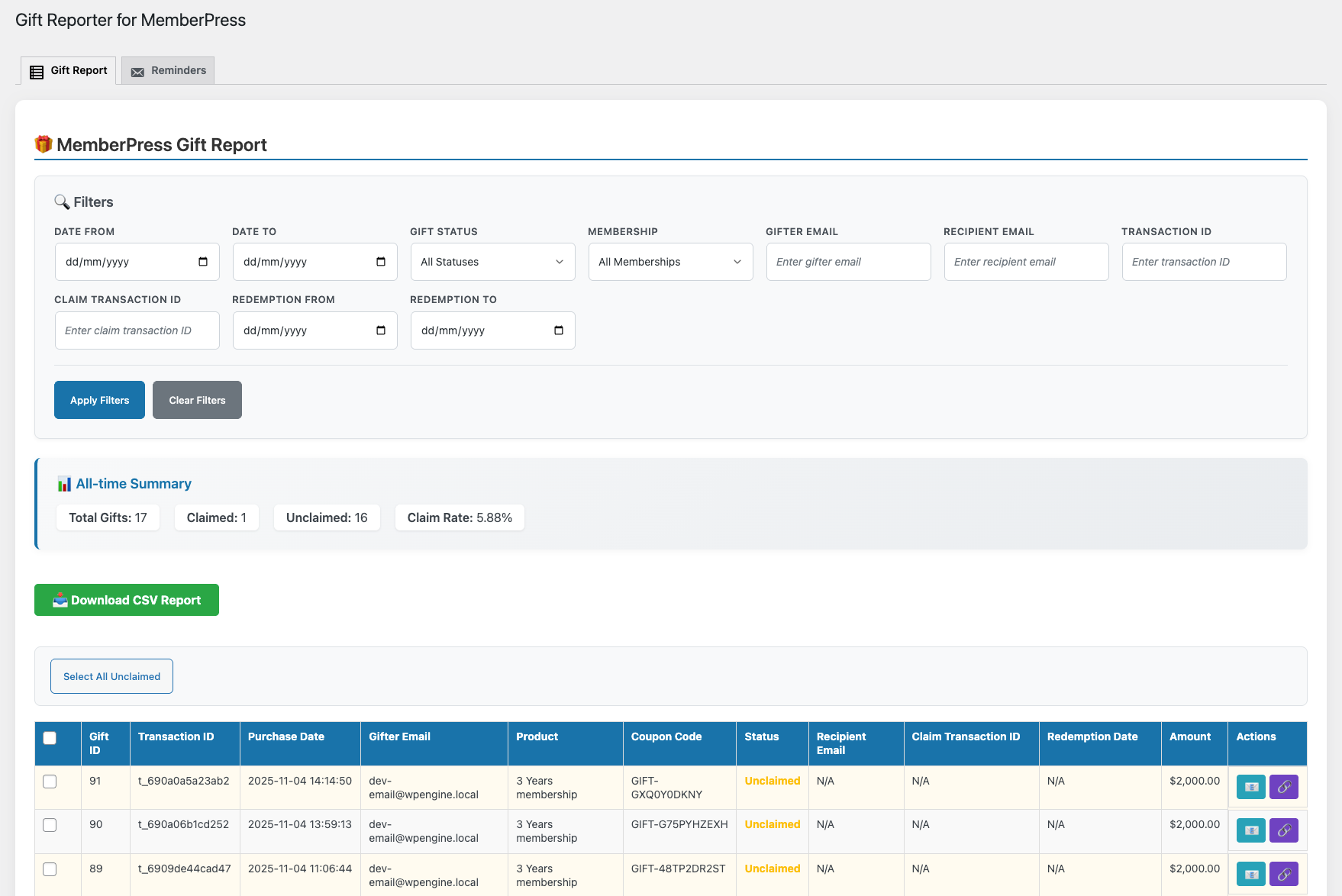
The Gift Report screen gives you a filterable table of all gift transactions. You can filter by:
- Date range — See gifts from a specific period (great for campaign analysis).
- Status — Filter by claimed, unclaimed, or expired.
- Membership product — See which products are being gifted most.
- Buyer email — Find all gifts purchased by a specific person.
- Recipient email — Look up a specific recipient’s gift status.
- Transaction ID — Jump straight to a specific gift if you have the transaction reference.
These filters combine, so you can do things like “show me all unclaimed gifts for the Annual Plan purchased in December” in a few clicks.
Resending Gift Emails and Copying Redemption Links
One of the most common support requests on membership sites is “I bought a gift but the person never got the email.” With Gift Reporter, you can find the specific gift and either resend the redemption email or copy the redemption link directly. No database diving, no guesswork.
Bulk Reminders for Unclaimed Gifts
This is where things get powerful. Instead of manually emailing recipients one by one, you can select all unclaimed gifts (or a filtered subset) and send reminder emails in bulk. The plugin handles the sending and respects WordPress email limits.
Automated Reminder Schedules
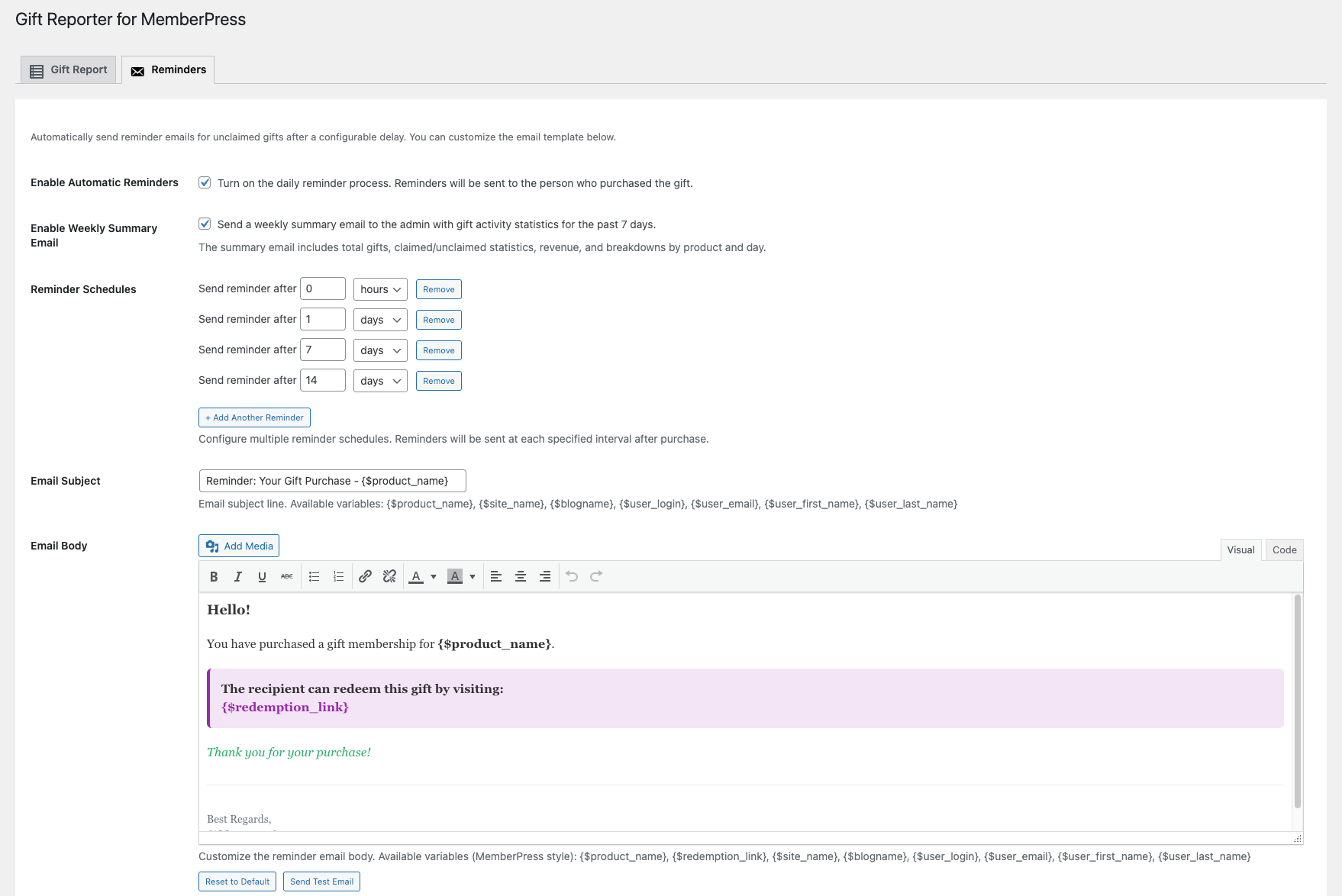
If you don’t want to manually trigger reminders, you can set up automated schedules. For example, you could configure the plugin to automatically send a reminder 3 days after a gift is purchased if it hasn’t been redeemed, and another at 7 days. The email subject and body are fully customizable under the Reminders tab.
You can also override the email template entirely by copying views/emails/reminder-email.php from the plugin folder into your theme at your-theme/memberpress-gift-reporter/emails/reminder-email.php.
Weekly Admin Summary
Enable the weekly summary email to get a digest of gift activity — new gifts, redemptions, and outstanding unclaimed gifts — delivered to your inbox. Useful if you want passive awareness without logging into the dashboard every day.
CSV Export
Apply any combination of filters, then click Download CSV Report to export the matching rows. The export includes buyer details, recipient details, gift status, transaction IDs, dates, and membership product info. This is particularly useful for:
- Sending to your accountant or bookkeeper.
- Importing into a CRM or email marketing tool.
- Running analysis in a spreadsheet for seasonal campaigns.
REST API
For developers or teams that integrate MemberPress data with external systems, Gift Reporter exposes a REST API. This lets you pull gift data programmatically — useful for custom dashboards, external reporting tools, or syncing with third-party services.
Practical Workflows
Here are a few real-world workflows that become possible once you have proper gift tracking in place.
Holiday Campaign Analysis
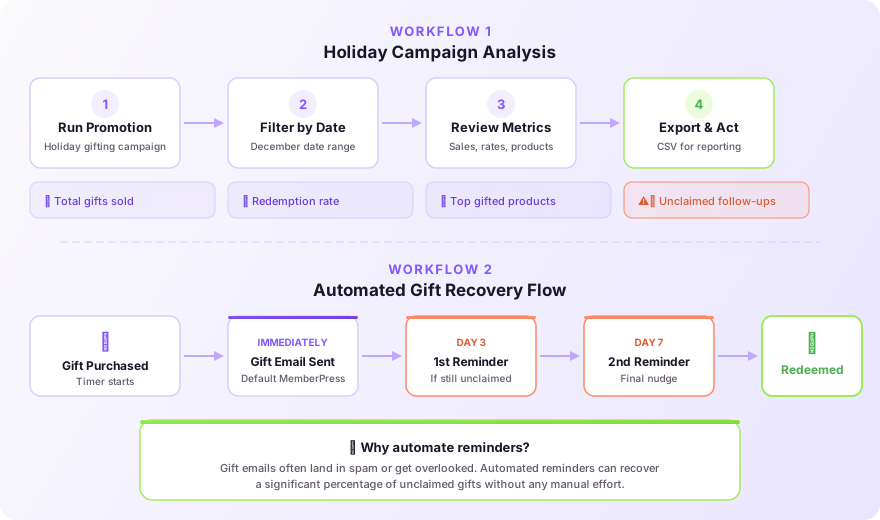
Run a gifting promotion in December. In January, filter gifts by the December date range and check:
- Total gifts sold (revenue impact).
- Redemption rate (are recipients actually activating?).
- Which products were gifted most (informs next year’s promotion).
- How many gifts are still unclaimed (opportunity for follow-up).
Automated Recovery Flow
Set up automated reminders at day 3 and day 7 for unclaimed gifts. Customize the email to include the recipient’s name and a clear call-to-action. This alone can recover a significant percentage of otherwise-lost activations.
Monthly Gift Health Check
Enable the weekly admin summary. Once a month, export a full CSV of all gifts from the past 30 days. Review redemption rates by product, identify any patterns (certain products have lower redemption rates, certain buyer segments gift more), and adjust your strategy.
Support Ticket Resolution
When a customer contacts support saying their gift recipient didn’t get the email, search by buyer or recipient email in Gift Reporter. Find the gift, verify its status, and either resend the email or provide the redemption link — all within 30 seconds.
Tips for Improving Gift Redemption Rates
Tracking is only half the battle. Here are some tips to actually improve the numbers you’re tracking.
Make the redemption email unmissable. The default MemberPress gifting email is functional but plain. Consider customizing it to be more visually appealing and clearly explain what the recipient is getting and how to activate it.
Set expectations with the buyer. After purchase, let the buyer know they can check back or contact support if the recipient hasn’t redeemed. Some sites include a “gift status” note in the purchase confirmation email.
Use reminders — but don’t overdo it. Two or three reminders over 7–10 days is a reasonable cadence. More than that and you risk annoying someone who intentionally chose not to redeem.
Consider seasonal timing. If someone buys a gift on December 20, the recipient might not redeem it until December 25 or later. Don’t trigger reminders too aggressively during holiday windows.
Offer a clear landing page. Make sure the redemption link lands on a page that explains what the membership includes and makes activation frictionless. If someone doesn’t know what they’re redeeming, they won’t bother.
Wrapping Up
Gift memberships are one of the most underutilized growth levers on membership sites. They bring in revenue from your existing members while introducing your content to entirely new audiences. But without proper tracking and follow-up, a surprising percentage of that value evaporates — gifts go unclaimed, recipients never engage, and you have no data to improve the process.
Whether you use Gift Reporter, build your own solution, or stick with manual tracking, the important thing is to treat gift management as an active process rather than a set-and-forget feature.
Get Started with Gift Reporter
Gift Reporter is free and takes under a minute to set up. Download it from WordPress.org, activate it, and head to MemberPress → Gift Report to instantly see every gift transaction on your site — no configuration needed.
If it saves you time, a quick review on WordPress.org helps other MemberPress site owners find it too.
Have questions, feature requests, or running into an issue? Reach me at omaraelhawary@gmail.com.
Have a similar challenge?
I help SaaS companies and WordPress platforms solve their most complex technical problems.
Let's Talk