Why MemberPress Needs a Staging Safe Mode
One of the worst things a MemberPress site owner can discover on a Monday morning is that their staging site spent the weekend acting like production.
The scenario is almost always the same. The team clones production to staging to test an upgrade, debug an issue, or trial a new addon. The staging database now contains every active subscription, every pending renewal, every customer email address. WordPress cron keeps running. MemberPress keeps doing its job. Receipts, renewal notices, and expiration reminders get sent from staging to real customers — and the lucky teams catch it before the gateway-side charges start.
By the time someone notices, the support inbox is full and trust has taken a hit.
This is the exact problem Staging Safe Mode for MemberPress was built to solve.
Email Is Just the Loudest Failure Mode
When people think about staging safety, they think about email — because email is the failure that screams. A customer gets a renewal notice from staging.yoursite.com and the support tickets follow.
But email is not the only thing MemberPress does on a schedule. Reminder crons fire. Webhooks fire back to live gateway accounts. The MemberPress Developer Tools addon, useful as it is, can mutate state in ways that are dangerous against production data. None of these scream — they fail silently, until they don’t.
A clone is a copy of production with no knowledge that it is a copy. Anything production was scheduled to do, the clone will also try to do, against the same external systems.
The fix has to cover all of those failure modes, not just the noisy one.
Why the Obvious Fixes Don’t Work
“Just disable wp_mail() entirely on staging.” Now 2FA codes don’t send, password resets don’t work, and you’ve locked your own team out of the staging site you were trying to test.
“Just put gateway keys in test mode after every clone.” This is a checklist item that one person on the team will eventually skip. The blast radius of skipping it is a real charge against a real customer card.
“Just remember to disable cron after cloning.” Disabling all cron breaks the very thing you’re often trying to test. And like every “just remember” fix, this is the failure mode the plugin exists to prevent.
The pattern across all three: blunt instruments that either break legitimate workflows or depend on humans never forgetting.
Five Safeguards Behind One Toggle
Staging Safe Mode is configured under MemberPress → Staging safe mode. When the site is treated as non-production and safe mode is on, you can toggle each safeguard independently:
| Safeguard | What it does |
|---|---|
| Emails | Clears recipients on mepr_wp_mail_recipients and short-circuits wp_mail() for MemberPress core and addons. Other plugins’ mail is unchanged. |
| Reminders | Forces MemberPress to skip reminder crons and per-event reminder sends. |
| Gateways | Filters option_mepr_options so supported gateways read as test_mode / sandbox — at read time, without modifying the database. |
| Developer Tools | Deactivates the MemberPress Developer Tools addon while safe mode is on, and restores it when safe mode is turned off. |
| Notifications | Sends one-time admin emails when non-production is detected, when force-override is enabled, and when safe mode is first turned on. |
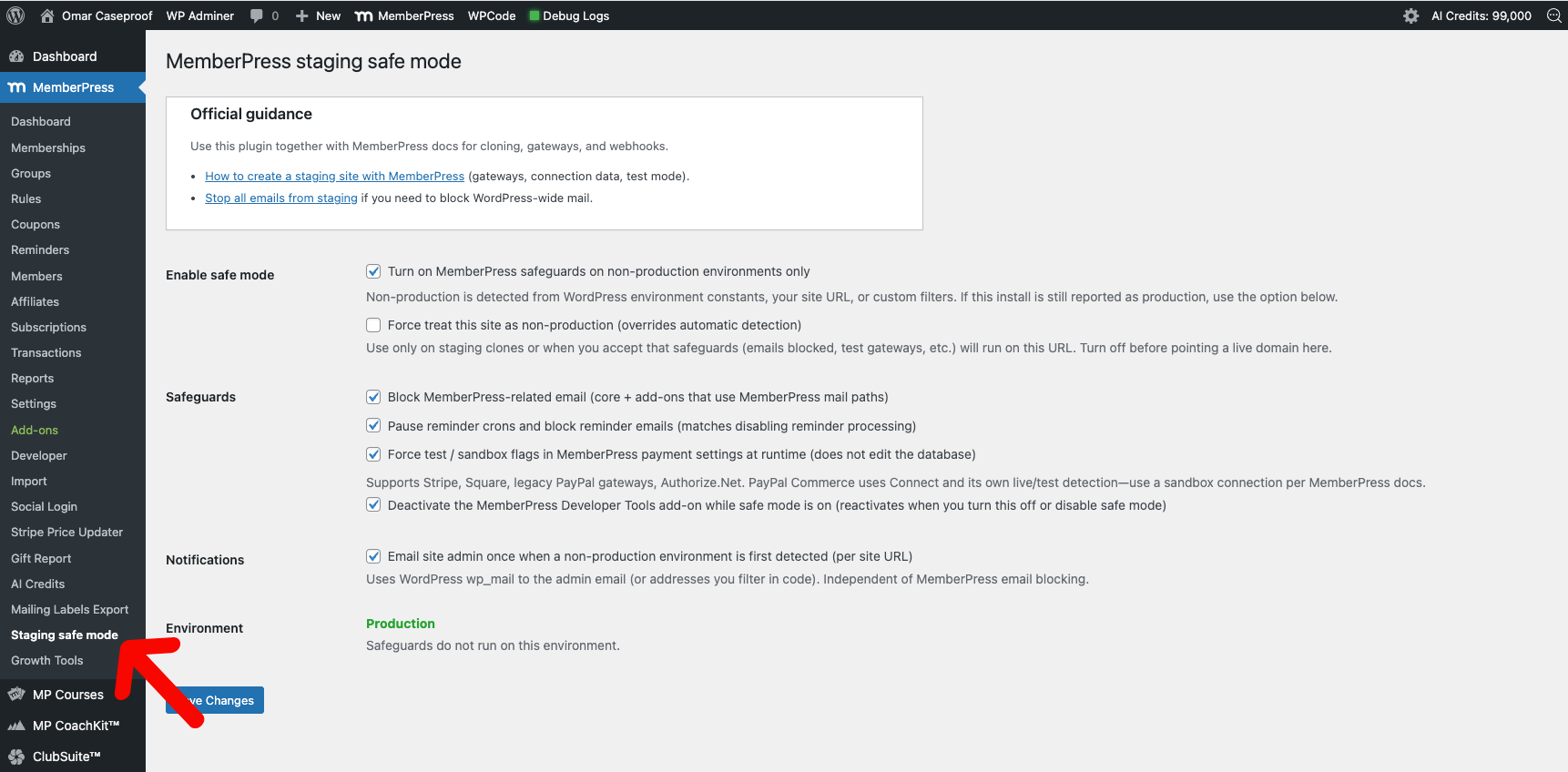
Each safeguard has its own checkbox. Each runs only when safe mode is on and the site is treated as non-production.
What I Built Under the Hood
Email blocking is surgical, not blunt. Core MemberPress emails get blocked by clearing the recipient list on mepr_wp_mail_recipients — the send loop runs, but with nothing to send. Addons that bypass the core system and call wp_mail() directly get caught by a pre_wp_mail short-circuit, but only when the call stack shows a file under wp-content/plugins/memberpress/ or wp-content/plugins/memberpress-*/. Everything outside that namespace — 2FA, password resets, plugin notifications — passes through untouched.
Gateways are sandboxed at read time, not write time. This was the design decision I spent the most time on. The naive approach is to flip a test_mode flag in the database when safe mode is enabled and flip it back when disabled. Two problems: it requires a database write to a settings table that may be mid-edit, and it gets undone by the next clone from production. Instead, the plugin hooks option_mepr_options and merges test/sandbox flags into the gateway integrations array when the option is read. The database is never touched. The next clone-from-production carries the safe mode setting forward, and gateways are automatically read as sandboxed again. Supported gateways include Stripe, the legacy PayPal family, Square, and Authorize.Net.
Reminder crons get belt-and-suspenders treatment. Reminders are suppressed in two places: pre_option_mepr_disable_reminder_crons returns truthy so MemberPress skips scheduling reminder crons in the first place, and mepr_{event}_reminder_disable filters return true for each reminder event so any reminder that did get through is blocked at send time. One layer would probably be enough; two layers means the failure mode of one bug doesn’t cost a customer.
Developer Tools unload is reversible. When the safeguard is enabled, the MemberPress Developer Tools addon is deactivated via deactivate_plugins(), and a flag is written to track that this plugin was the one that did it. When safe mode is turned off — or the environment goes back to production, or the safeguard checkbox is unchecked — the flag is read and the addon is reactivated. The plugin doesn’t permanently disable anything it didn’t install; it just borrows.
Force-override exists because automatic detection isn’t enough. A clone running on a URL without staging hints, with WP_ENVIRONMENT_TYPE left as production, is functionally indistinguishable from real production. Automatic detection will fail. The settings page exposes a “Force treat this site as non-production” checkbox so a human can declare what the environment actually is. The override is dangerous if left on against real production, so the notification system makes sure no one forgets — saving force-override fires an admin email.
Notifications are one-time per home_url(). Three triggers — detection, force-override, and safe mode being turned on — each send a single admin email per site URL. The tracking key is hashed against home_url(), which means the next time the database is cloned to a new staging URL, the notices fire again on the new host. The notifications survive the clone in exactly the way that matters: they re-arm.
Why This Matters Beyond the Fix
Three principles I keep coming back to:
Surgical scope. When you’re blocking something, block exactly the thing you mean to block. “Disable all email” is a sledgehammer; mepr_wp_mail_recipients plus a backtrace-aware pre_wp_mail is a scalpel. The fix should not be bigger than the problem.
Read-time over write-time. State you change in the database has to be changed back. State you change at read time changes itself back the moment the option is unhooked. For anything that needs to survive cloning and reconfiguration cycles, filter the read.
Design for the failure mode that matters. The failure mode here isn’t “the plugin doesn’t detect staging” — it’s “someone clones live to staging and the site does something irreversible against production systems before anyone notices.” Every safeguard, every notification, every override is shaped around that specific human moment. The plugin is doing the remembering so the team doesn’t have to.
The plugin is open source on GitHub.
Have a similar challenge?
I help SaaS companies and WordPress platforms solve their most complex technical problems.
Let's Talk