How I Built Admin Filters for MemberPress
A pattern I see often in support tickets:
A site has a few thousand members, address capture enabled at checkout, and three or four custom MemberPress fields collecting things like industry, company size, or referral source. The site owner opens MemberPress → Members and wants a simple answer: “show me everyone in Germany who signed up through our partner program.” Then they want the same question answered on Subscriptions: “of those, who is on an active monthly plan?” And on Transactions: “what did they pay last quarter?”
Out of the box, those questions don’t have a one-click answer. You can search by name, email, or username. You can filter by membership. But filtering by an address field or a custom field — across Members, Subscriptions, Lifetimes, and Transactions — means writing SQL, exporting to CSV, or building a custom report each time.
That’s the gap Admin Filters for MemberPress fills.
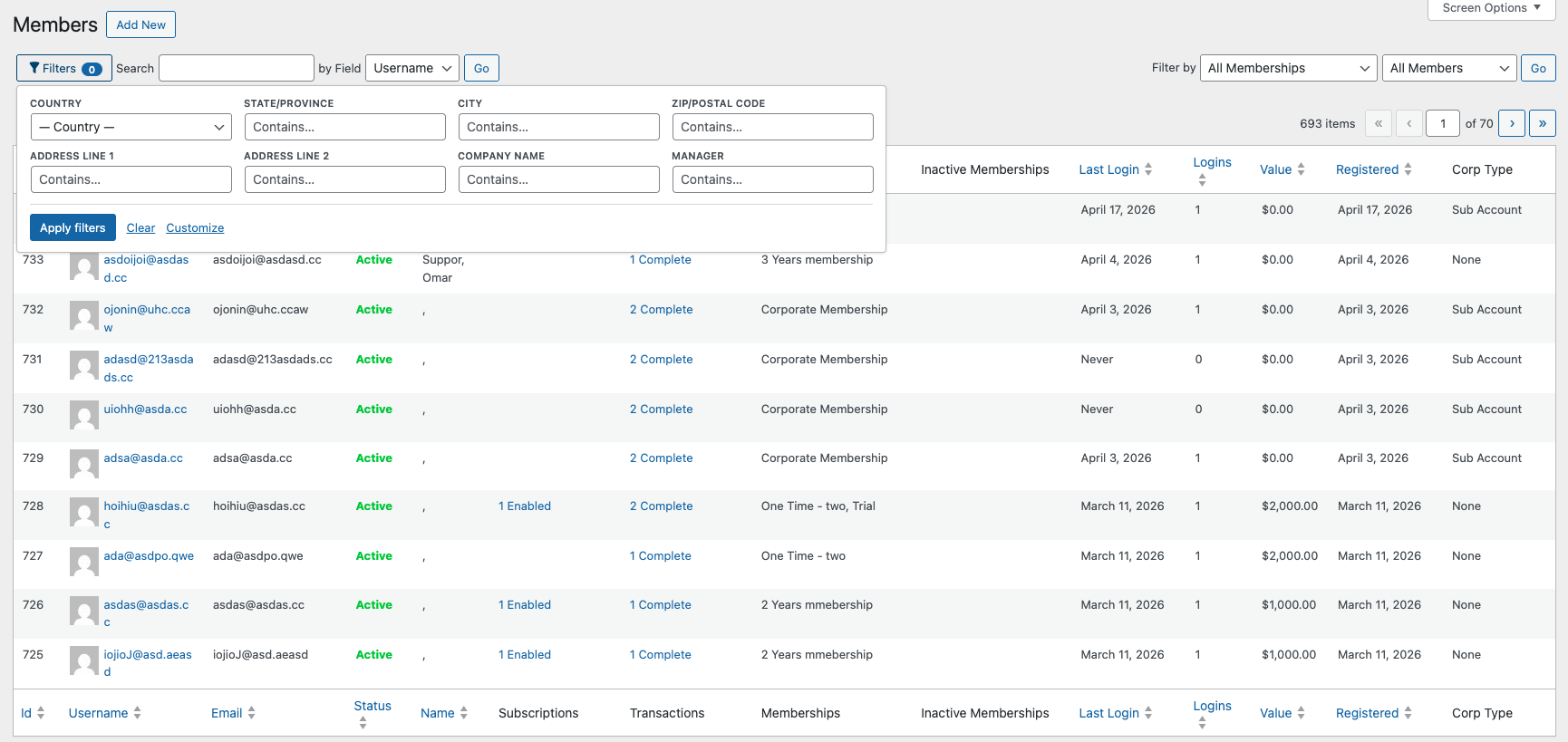
The plugin is live on WordPress.org and the source is on GitHub. Here’s how I built it, and why I made the architectural choices I did.
Admin Filters for MemberPress is an independent, third-party plugin. It is not affiliated with, endorsed by, or sponsored by MemberPress.
The Constraint: No Core Files Modified
The first decision I made was the most important one: the plugin would only use MemberPress’s public hooks. No core file edits, no monkey-patching, no fork.
This rules out a lot of “easier” implementations, but it’s the only approach that survives MemberPress upgrades. A plugin that requires forking core is a maintenance liability — it breaks the moment the host product ships a new release, and it puts the site owner in the position of choosing between an upgrade and a feature.
The two hooks I needed were already there:
mepr_table_controls_search— lets me render filter controls inside the existing MemberPress toolbarmepr_list_table_args— lets me modify the query MemberPress runs to populate each admin list
Everything else is layered on top of those two extension points.
Auto-Discovering Custom Fields
The interesting design question was: what should the plugin filter by?
The conservative answer is “country and city.” That covers the most common case. But MemberPress already has a custom field system at Settings → Fields where site owners define their own data. If the plugin only filtered the built-in fields, every custom field would still need a manual add_filter call.
So I made the plugin read the custom field configuration directly and expose every defined field as a filter automatically. Field type drives the matching strategy:
dropdown,radios→ exact matchmultiselect,checkboxes→ substring match against the serialized valuecheckbox→ checked / not settext,email,url,tel,date,textarea,file→ “contains” search
A site owner who adds a new custom field in MemberPress sees it appear as a filter automatically. No code, no configuration step.
The SQL Strategy: EXISTS Subqueries
The naïve way to filter by user meta is a JOIN on wp_usermeta. That works for one field. The moment you filter by two fields, you have a duplicate row problem — and the moment you filter by a multiselect field, the join math gets worse.
Instead, every filter is appended as an EXISTS ( SELECT 1 FROM {$wpdb->usermeta} WHERE ... ) subquery, scoped to the user-column alias that the underlying list query uses.
That gives me three properties I needed:
- Composable — adding another filter is just another
AND EXISTS (...). No join math, no row duplication. - Scoped — every predicate is bound to the same user the outer query is selecting. No cross-contamination.
- Safe to no-op — if the current request isn’t actually one of the supported list screens (some migration tools call
mepr_list_table_argsin unrelated contexts), the filter does nothing.
The third property is the reason the plugin ships with a unit test suite covering screen detection. Without it, an unrelated query passing through the same hook could be silently altered.
Generalizing Across Four Screens
The original release only filtered the Members screen. Adding Subscriptions, Lifetimes, and Transactions in 1.7.0 was the moment the architecture paid off.
All four screens are list queries over MemberPress data, and each one carries a user column the predicate can attach to. Because the EXISTS subqueries are scoped to whichever alias the host query uses — not hard-coded to a single table — extending to a new screen wasn’t a rewrite. It was teaching the plugin which alias each new screen uses, and reusing the same predicate builder that already worked on Members.
The lesson I keep relearning: a small architectural decision early (scope filters to a passed-in alias, not a constant) is what makes the second, third, and fourth use case nearly free.
Extending It Yourself
For developers who need filters beyond the built-in address and custom fields, the entire filter list passes through meprmf_members_meta_filters_fields:
add_filter( 'meprmf_members_meta_filters_fields', function ( $fields ) {
    $fields[] = [
        'param'    => 'mpf_ext_referrer',
        'meta_key' => 'signup_referrer',
        'label'    => __( 'Referrer', 'your-textdomain' ),
        'type'     => 'text',
        'match'    => 'like',
    ];
    return $fields;
} );
That’s the same hook the plugin uses internally to register its own filters. There’s no separate “private” path — what works for me is what works for you.
Why This Matters Beyond the Fix
“Extending a plugin” is often treated as a binary choice: either the host plugin exposes the exact hook you need, or you fork it.
The middle path — building a layered, hook-only extension that auto-adapts to the host plugin’s configuration and generalizes across multiple screens — is the one I reach for whenever I can. It’s slower to build because you have to find or design the right extension points. But it’s the only kind of customization that survives in production for years.
That’s the principle I applied here: the cleanest extension is the one the host plugin never has to know about.
The plugin is live on WordPress.org. Source is on GitHub. Issues and pull requests welcome.
Have a similar challenge?
I help SaaS companies and WordPress platforms solve their most complex technical problems.
Let's Talk