Controlling the Past: Building Forward-Only Access for MemberPress
Membership sites are built around the idea of access. But most access control logic answers only one question: does this member have the right membership? It rarely asks a second, equally important one: was this content published before they even joined?
This gap is where the MemberPress Forward-Only Access plugin was born.

The Problem: Retrofitting Access Isn’t Always Fair
Imagine a membership site that publishes weekly training modules. A member joins in March. MemberPress — by default — grants them access to everything their membership level protects, including all the modules published back in January and February. For some sites that’s intentional. For others, it completely undermines the value of joining early, or the pricing model behind time-gated content.
I kept encountering this scenario in support escalations: site owners who wanted to reward early members and enforce a “you get what’s published from your join date forward” model — but had no native way to do it inside MemberPress.
The Solution: Date-Aware Access Control
The plugin compares two timestamps on every protected content request:
- The post’s
post_date— when the content was published. - The member’s earliest qualifying active transaction start date — effectively their membership signup anchor.
If the member joined after the content was published, access is blocked. Everything published from their join date onward remains accessible under normal MemberPress rules. Admins (manage_options) are never blocked, so testing and management stay frictionless.
What You Can Configure
The plugin ships with a dedicated settings page under MemberPress → Forward-Only Access that covers three areas.
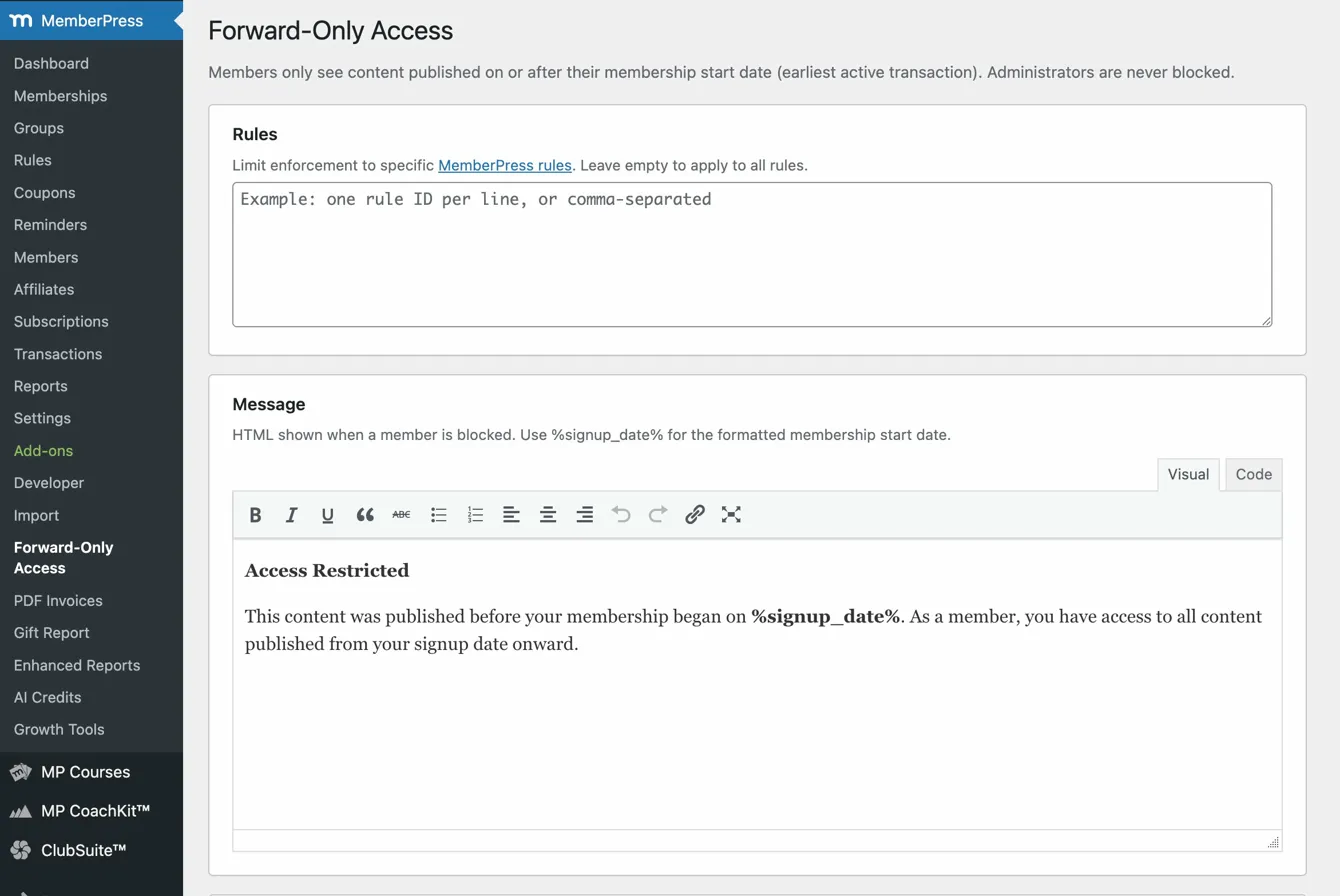
Rules Scope — You can scope the forward-only logic to specific MemberPress rule IDs, or leave it empty to apply universally across all rules that protect content. This gives you surgical control when you only want the behavior on certain membership tiers.
Blocked Message — Fully customizable HTML shown when access is denied. A built-in WYSIWYG editor lets you style the message without touching code. The %signup_date% placeholder renders the member’s actual start date inline, so the message always feels personal rather than generic.
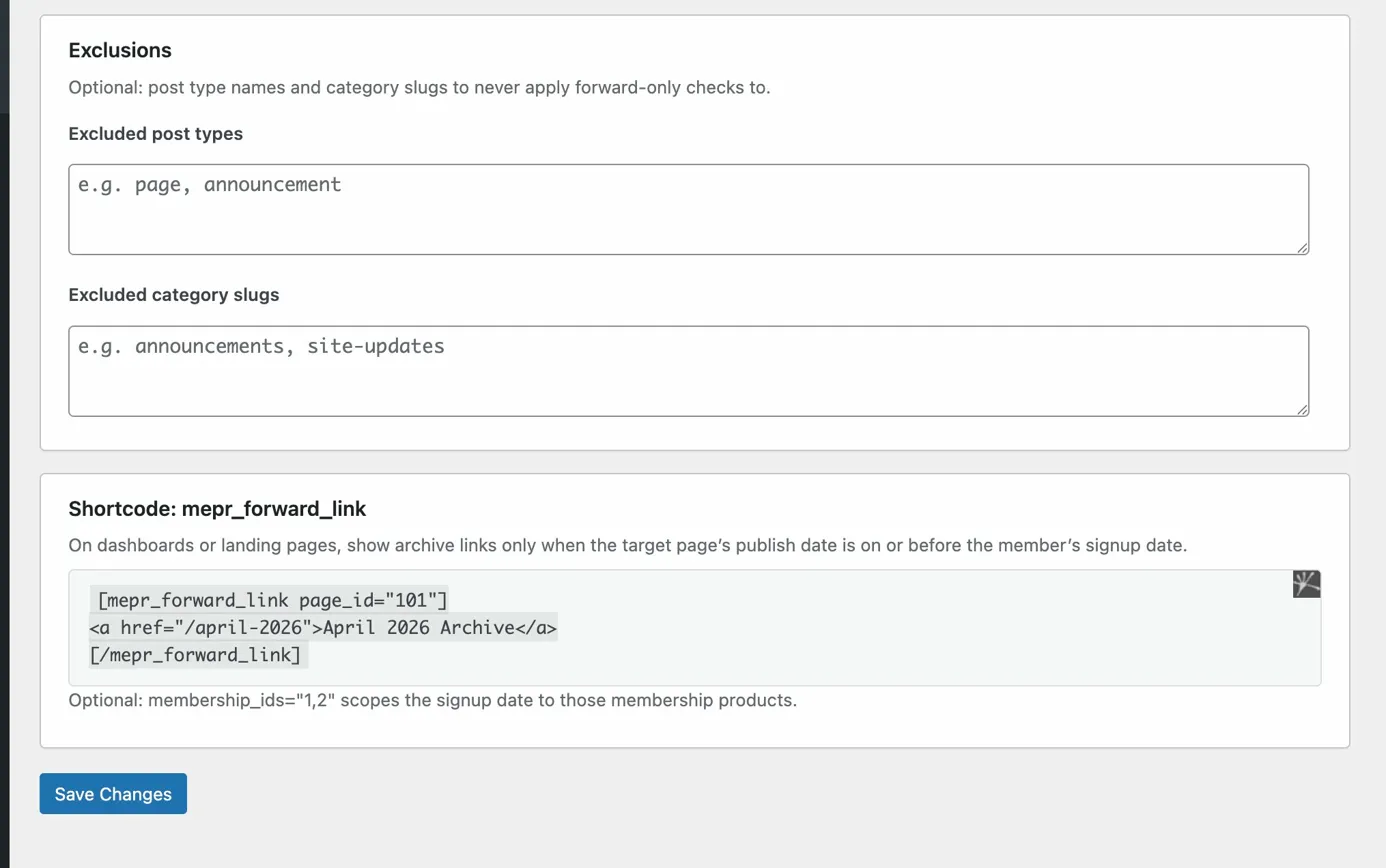
Exclusions — Post type names and category slugs you never want the forward-only check to apply to — entered comma- or line-separated. Useful for evergreen content like FAQs, glossaries, or onboarding pages that should always be accessible regardless of join date.
For developers and agencies managing multiple environments, both the rule IDs and the blocked message can be hardcoded via wp-config.php constants, with the settings screen surfacing a notice when overrides are active.
Developer-Friendly by Design
Beyond the settings UI, the plugin exposes a few extension points for theme and plugin developers:
Filters for adding exclusions programmatically, without touching the database settings:
add_filter( 'mepr_forward_only_exclude_post_types', function( $types ) {
    $types[] = 'resource';
    return $types;
});
PHP helper functions that mirror the internal API — useful when you need to check forward-only logic from a theme template or another plugin:
// Get a member's signup timestamp
$ts = mepr_forward_only_get_signup_ts( $user_id );

// Check if a rule participates in forward-only enforcement
$applies = mepr_forward_only_rule_applies( $rule_id );

// Check if a post is excluded from forward-only checks
$excluded = mepr_forward_only_is_excluded( $post );
A [mepr_forward_link] shortcode for dashboard or landing page use. It renders its inner content only when the linked page’s publish date is on or before the member’s signup — handy for building archive navigation that automatically hides future content from early members while surfacing the right links to newer ones.
Engineering Decisions Worth Noting
A few choices made during development that I think are worth highlighting:
Transaction-based anchor, not subscription date. The plugin uses the member’s earliest qualifying transaction as the signup reference, which is the same basis MemberPress itself uses internally. This ensures consistency with how MemberPress already reasons about membership status.
Non-destructive by design. The plugin layers on top of MemberPress’s existing access control — it doesn’t replace or bypass it. A member still needs a valid active membership to access content. Forward-only is an additional gate, not a substitute.
Clean uninstall. Deactivating leaves your database untouched (so you can re-enable without losing settings). Uninstalling removes the mepr_forward_only_settings option cleanly.
PHPUnit test coverage. The repo ships with a phpunit.xml.dist config and a tests/ directory, keeping the core logic verifiable as the plugin evolves.
Who This Is For
This plugin is a good fit for:
- Cohort-based courses where each cohort only accesses content from their enrollment date forward.
- Newsletter or drip content sites that publish new issues regularly and want to preserve the “you missed it” model.
- Tiered membership programs that need to differentiate early vs. late joiners beyond just pricing.
If your MemberPress site publishes content on a schedule and access-by-join-date matters to your business model, this closes the gap that MemberPress core doesn’t address out of the box.
View the project: MemberPress Forward-Only Access on GitHub
Have a similar challenge?
I help SaaS companies and WordPress platforms solve their most complex technical problems.
Let's Talk