How I Built the Administrator Rescue Link for the Members Plugin
One of the most common support scenarios I’ve handled at the Tier 3 level goes something like this: an administrator is using a role management plugin, makes a change to their own Administrator role, and accidentally removes a capability that locks them out of WP Admin entirely.
The site is still live. Users are still logging in. But the person who runs the site can no longer access their own dashboard.
This is the exact problem the Administrator Rescue Link feature in the Members plugin was built to solve — and I built it.
Why This Keeps Happening
WordPress’s role and capability system is more flexible than most people realize. Roles don’t have inherent privilege levels — they’re just labeled containers for capabilities. The Administrator role has admin-level access because it’s been assigned capabilities like manage_options, activate_plugins, and edit_users — not because of any hardcoded hierarchy.
When you use Members to manage roles, that flexibility is exposed directly. You can add, remove, or deny any capability on any role. That’s powerful. It’s also why it’s entirely possible to accidentally remove a critical capability from your own Administrator role and immediately lose the ability to access the admin area.
Before this feature, the recovery path required database access — opening phpMyAdmin, finding the right row in wp_usermeta or wp_options, and manually restoring the role. That’s a high bar for most site owners, and it carries real risk even for developers who know what they’re doing.
The Solution: A Magic Link to Your Email
The Administrator Rescue Link works through a secure, time-limited magic link sent to the site administrator’s registered email. Clicking it verifies identity and automatically restores Administrator role capabilities — no database, no server access, no developer required.
The link operates through a dedicated front-end endpoint, so it works even when WP Admin is completely inaccessible.
How to Use It When You’re Locked Out
The feature is always active when the Members plugin is installed. The rescue page is accessed by appending ?action=members_rescue to your login URL.
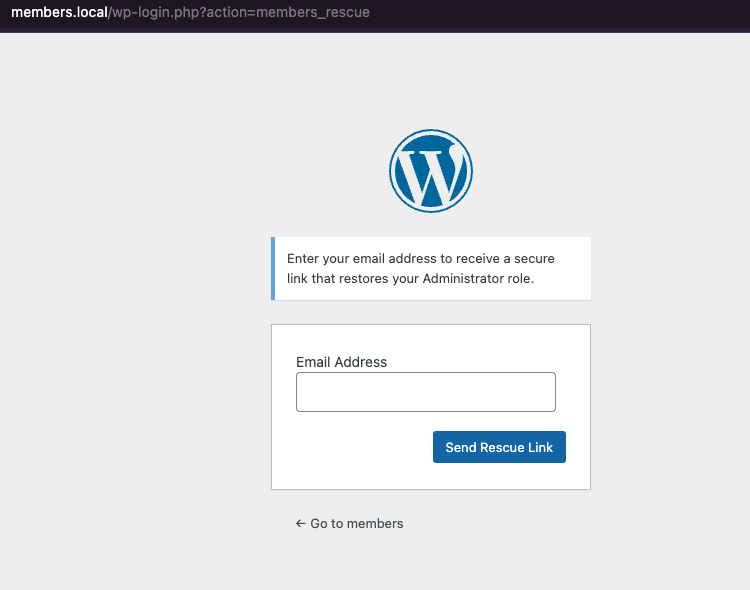
If you find yourself locked out:
- Go to
yoursite.com/wp-login.php - In the address bar, add
?action=members_rescueso the full URL isyoursite.com/wp-login.php?action=members_rescue - Enter the email address of an account that has (or had) the built-in Administrator role, or is a Super Admin on multisite
- Click “Send Rescue Link” — if the account is eligible, a secure link will be sent to that email (check spam if it doesn’t arrive)
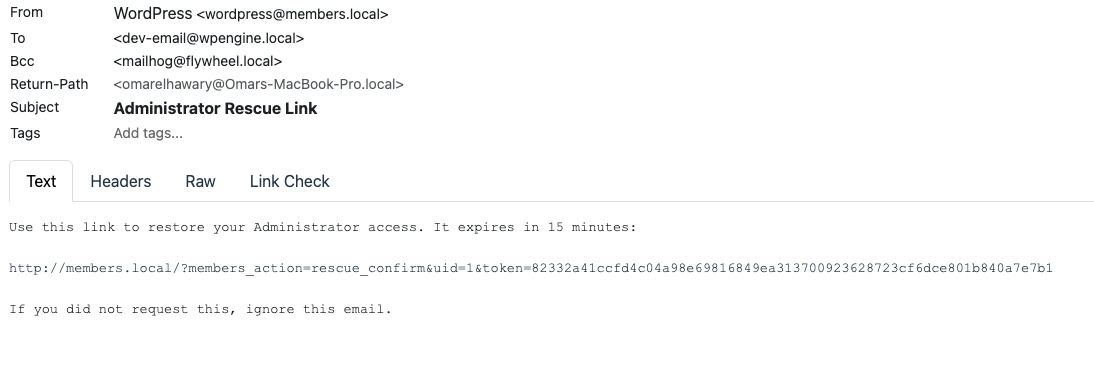
- Open the link from the email within 15 minutes — your Administrator role and Members capabilities will be restored, and you’ll be redirected to the login page to sign in
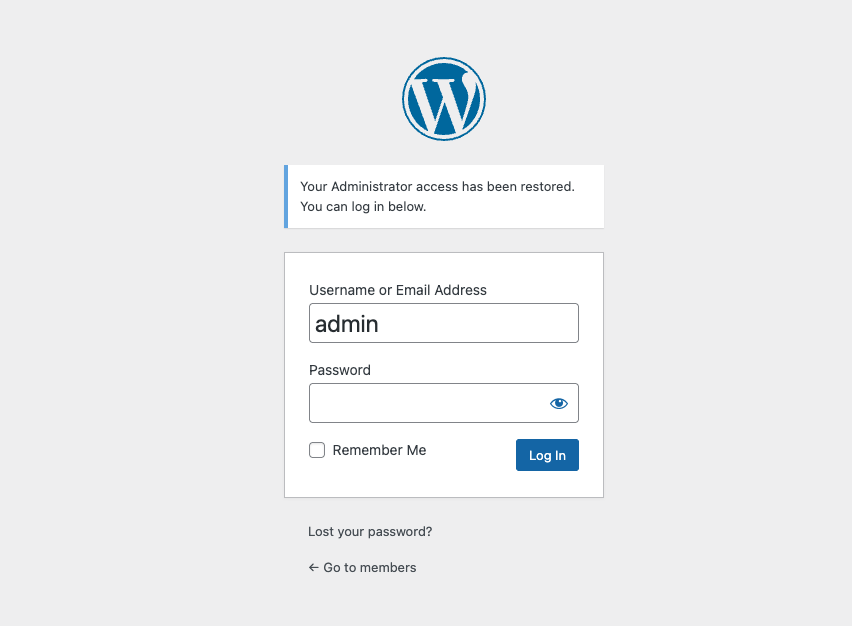
Access is restored. No database. No support ticket. No downtime.
What I Built Under the Hood
Here’s a breakdown of the implementation decisions worth knowing about.
Rescue is scoped to Administrator roles and Superadmin only. The user_can_be_rescued() function checks that the requesting user actually holds — or held — the Administrator role, and covers Superadmin status on both single-site and multisite installations. This is intentional: the rescue path is a high-trust operation and should only be available to the right users.
Token-based with a defined rate limit window. Tokens are generated securely and verified against a constant-defined rate limit window. Rate limiting is applied per-user — a user can only request a set number of rescue links within that window. This prevents abuse without being so restrictive it blocks legitimate recovery attempts.
Streamlined message handling. I refactored the rescue flow to remove redundant members_rescue checks that were spread across multiple code paths. All message assignment for the email verification step is now handled in a single, predictable place inside the magic link class.
Simplified rate limit calculation. The previous approach involved multiple queries and conditionals that were hard to follow. The refactored version consolidates this into a single readable method with a clear signature.
Readme updated. The readme.txt shipped with this release includes documentation on how to use the magic link feature — so it’s visible directly on the WordPress.org plugin page.
Why This Matters Beyond the Fix
A plugin that manages permissions is only trustworthy if it can recover from its own misuse. The Members plugin gives site owners fine-grained control over WordPress roles — that’s valuable, but it also raises the cost of a misconfiguration. Shipping a safe, no-database recovery path is the right call.
The principle I applied here: the safest escape hatch is the one that doesn’t require a developer to pull. That holds whether you’re building for non-technical site owners or enterprise environments where database access is restricted.
The feature is live in the latest release of the Members plugin.
For full usage documentation, see the official docs.
Have a similar challenge?
I help SaaS companies and WordPress platforms solve their most complex technical problems.
Let's Talk